Deploying
Your edition is ready. Let's publish it so anyone can access it online.
Deploy to GitHub Pages
::: note This requires to maintain your project as a git repository (the scaffold initialises one by default), commit all your files and push them to a remote repository on GitHub. :::
The scaffold includes a GitHub Actions workflow that automatically builds and deploys your site on every push. Setup takes one step:
- Go to your repository on GitHub
- Click Settings > Pages
- Under Source, select GitHub Actions
- Click Save
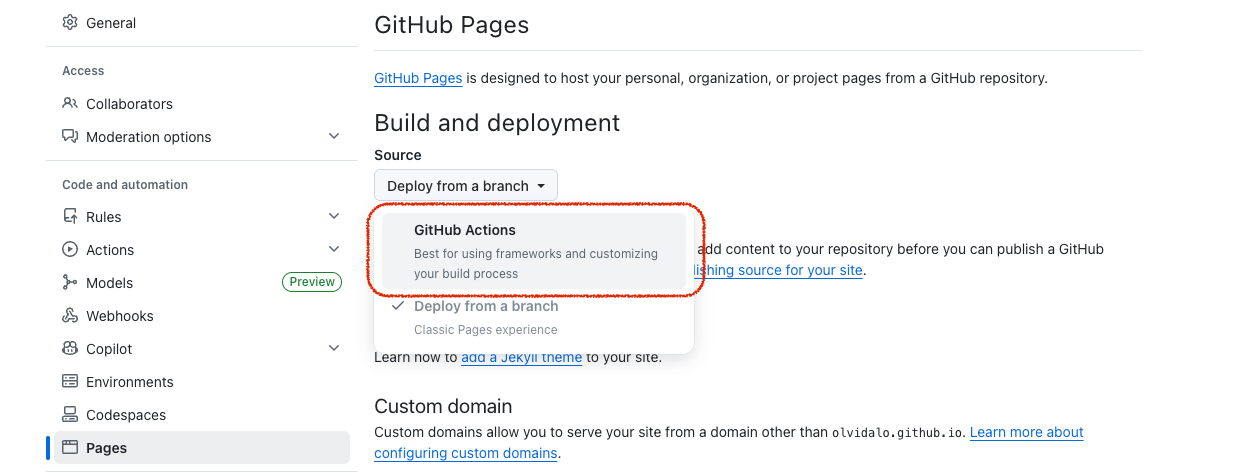
Push to main and your site will be live at https://your-username.github.io/your-repo-name/ within a few minutes. If you already pushed before enabling Pages, go to Actions > Deploy to GitHub Pages > Run workflow to trigger the first build manually.
First build
The first build takes longer (several minutes for large collections) because it processes every file from scratch. Subsequent builds are much faster thanks to caching.
For more details on build caching, clean builds, custom domains, and other hosting options, see Publishing Your Site.
Export for Other Hosting
If you prefer to deploy to another platform (Netlify, your own server, etc.), use the desktop app's Export button to build the site and save it to a folder. See Publishing Your Site for all options.