Adding Content
Right now, the preview site shows our customized header and homepage, but if you click the "Seals" menu item you get an empty page. Let's add seals.
We're now working with: Pipeline Configuration (pipeline.xml)
This step is about configuring XML/XSLT transformations: telling the pipeline which XML files to process, which stylesheets to use, and where to write the output. See Content and Templates for how this relates to the website templates.
What We Need
Seals are encoded as individual SigiDoc/EpiDoc XML files. To get them onto the website, we need to:
- Provide the XML source files as input to the pipeline
- Configure the pipeline to transform each XML file into an HTML page
- Generate the metadata needed for the seal list, indices, and search
Adding Source Files
Create a seals directory inside source/ and place the SigiDoc XML files from the Robert Feind Collection's repository (ZIP file) there:
my-sigidoc-project/
├── pipeline.xml
├── source/
│   ├── seals/                    # ← NEW: your SigiDoc XML files
│   │   ├── Feind_Kr1.xml
│   │   ├── Feind_Kr10.xml
│   │   ├── Feind_Kr102.xml
│   │   └── ...
│   ├── authority/
│   ├── stylesheets/
│   └── website/
Using Git
If you your project is in a git repository and your seal files are too, you can add them as a Git submodule instead of copying files using GitHub Desktop or the command line:
git submodule add https://github.com/byzantinistik-koeln/feind-collection.git source/sealsThis keeps the source documents linked to their own version history.
Configuring the Pipeline
Now open pipeline.xml. You'll find a commented-out <xsltTransform> node with the name transform-epidoc that serves as a starting point. Uncomment the node.
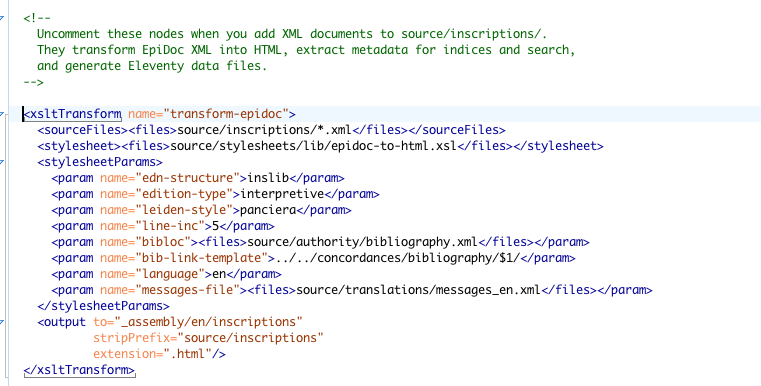
An <xsltTransform> node is the core building block of the pipeline: it takes a set of XML source files, applies an XSLT stylesheet to each of them, and writes the resulting output. You configure it by telling it what to transform, how to transform it (which stylesheet and parameters), and where to put the results.
Let's adapt it step by step.
Step 1: Source Files
The first thing to configure is where the node finds its input:
<xsltTransform name="transform-epidoc">
	<sourceFiles><files>source/inscriptions/*.xml</files></sourceFiles>
	<!-- ... -->
</xsltTransform>
The <files> element contains a glob pattern, a way to describe a set of files using wildcards. source/inscriptions/*.xml means "all XML files directly inside the source/inscriptions/ folder". Since we have put the SigiDoc Seal files into source/seals/ in the previous step, change source/inscriptions/*.xml to source/seals/*.xml. You could also use source/seals/**/*.xml to include files in subdirectories recursively.
Wrapping a path in <files> does more than just point the node to its input. It also registers those files as tracked dependencies. When you run the pipeline a second time, the node checks each input file individually: if a file hasn't changed since the last build, its cached result is reused and the transformation is skipped for that file. Only files that actually changed get re-processed. This is what makes incremental rebuilds fast: editing one seal doesn't require re-transforming all of them.
Step 2: Stylesheet
Next, specify which XSLT stylesheet to use for the transformation:
<xsltTransform name="transform-epidoc">
	<sourceFiles><files>source/inscriptions/*.xml</files></sourceFiles>
	<stylesheet><files>source/stylesheets/lib/epidoc-to-html.xsl</files></stylesheet>
	<!-- ... -->
</xsltTransform>
You can leave it as found in the example. This points to the framework's EpiDoc-to-HTML wrapper stylesheet. It imports the upstream EpiDoc or SigiDoc stylesheets and applies them to each source document, producing an HTML fragment for each seal.
XSLT Dependency tracking
Just like with <sourceFiles>, wrapping the stylesheet path in <files> registers it as a tracked dependency. The pipeline also detects stylesheets that are imported or included via xsl:import and xsl:include. So if you modify the main stylesheet or any stylesheet it imports, all affected documents will be re-transformed on the next build.
Step 3: Stylesheet Parameters
XSLT stylesheets accept parameters that control their behavior. The EpiDoc stylesheets have many options for rendering: which Leiden convention to use, how to display line numbers, where to find bibliography data, and more:
<stylesheetParams>
      <param name="edn-structure">inslib</param>
      <param name="edition-type">interpretive</param>
      <param name="leiden-style">panciera</param>
      <param name="line-inc">5</param>
      <param name="bibloc"><files>source/authority/bibliography.xml</files></param>
      <param name="bib-link-template">../../concordances/bibliography/$1/</param>
      <param name="language">en</param>
      <param name="messages-file"><files>source/translations/messages_en.xml</files></param>
    </stylesheetParams>
The language parameter tells the stylesheet to resolve UI labels (like "Material", "Type", "Dating") to English. The messages-file parameter points to the translation file and registers it as a dependency, so if you edit the translations, the pipeline rebuilds affected pages. The scaffold includes a stub with a few common keys, but for SigiDoc projects you need the complete translation file. Download it from the SigiDoc EFES repository and save it to source/translations/messages_en.xml, replacing the stub.
How do UI label translations work?
The SigiDoc stylesheets don't hardcode label text. Instead, they output placeholder elements like <i18n:text i18n:key="material"/>. The epidoc-to-html.xsl wrapper looks up each key in the messages file and replaces the placeholder with the translated text. Without the translation file, labels appear as bracketed keys like [material] instead of "Material".
For multi-language support, you can add additional translation files (messages_de.xml, messages_el.xml) and pass the corresponding language parameter. We'll do this in the Multi-Language Support step.
Step 4: Output Configuration
Finally, use the output specify where the HTML output should go:
<output to="_assembly/en/seals"
        stripPrefix="source/seals"
        extension=".html"/>
In the example, the to and stripPrefix attributes are configured for _assembly/en/inscriptions and source/inscriptions. In both cases, replace inscriptions with seals. This will make each seal available under 🌎 /en/seals/Feind_XYZ/ on the final website.
The <output> element attributes
By default, a node preserves the full input file path in the output. So if you only specified a target directory:
<output to="_assembly/en/seals"/>then source/seals/Feind_Kr1.xml would be written to _assembly/en/seals/source/seals/Feind_Kr1.xml, which is not what we want. The source/seals/ part of the path is just where the files happen to live in our project, not where they should end up on the website.
That's what stripPrefix is for: it removes the source directory source/seals from the output path for each transformed seal.
Now the path mapping works as expected:
| Input | Output |
|---|---|
source/seals/Feind_Kr1.xml | _assembly/en/seals/Feind_Kr1.html |
source/seals/Feind_Kr10.xml | _assembly/en/seals/Feind_Kr10.html |
The extension=".html" attribute changes the file extension from .xml to .html.
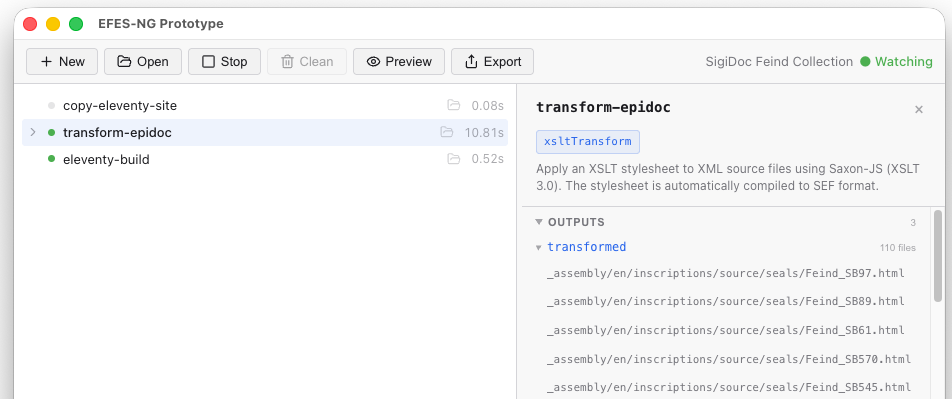
After a build, you can verify these output paths in the GUI: click on the node in the node list to open the node inspector panel, then expand the Outputs section to see all files the node produced:
The Complete Node
Putting it all together:
  <xsltTransform name="transform-epidoc">
    <sourceFiles><files>source/seals/*.xml</files></sourceFiles>
    <stylesheet><files>source/stylesheets/lib/epidoc-to-html.xsl</files></stylesheet>
    <stylesheetParams>
      <param name="edn-structure">inslib</param>
      <param name="edition-type">interpretive</param>
      <param name="leiden-style">panciera</param>
      <param name="line-inc">5</param>
      <param name="bibloc"><files>source/authority/bibliography.xml</files></param>
      <param name="bib-link-template">../../concordances/bibliography/$1/</param>
      <param name="language">en</param>
      <param name="messages-file"><files>source/translations/messages_en.xml</files></param>
    </stylesheetParams>
    <output to="_assembly/en/seals"
            stripPrefix="source/seals"
            extension=".html"/>
  </xsltTransform>
Building and Inspecting
If you already clicked Start earlier (during the customization step), the pipeline is in watch mode. It automatically detects changes to pipeline.xml and reloads the pipeline configuration. You should see the new transform-epidoc node appear in the node list, and a rebuild starts automatically.
If the pipeline is not running yet, click Start now.
Watch as the node processes each XML file. The progress counter shows how many seals have been transformed.
What Did the Pipeline Produce?
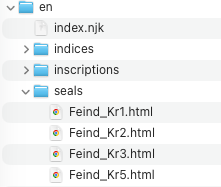
Once the build completes, let's look at what happened. Open the _assembly/en/seals/ directory in your file manager or editor. You should see an .html file for every input XML file: Feind_Kr1.html, Feind_Kr10.html, and so on.
TIP
To quickly open a node's output folder to inspect the files it produces, you can also click on the folder icon in the GUI's node list entry: 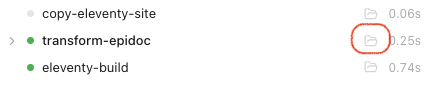
Open one of these HTML files in the editor. You'll see a partial HTML fragment containing the seal's transcription, metadata, and commentary, rendered by the SigiDoc stylesheets. This is the content that will eventually be embedded in a page on the site. 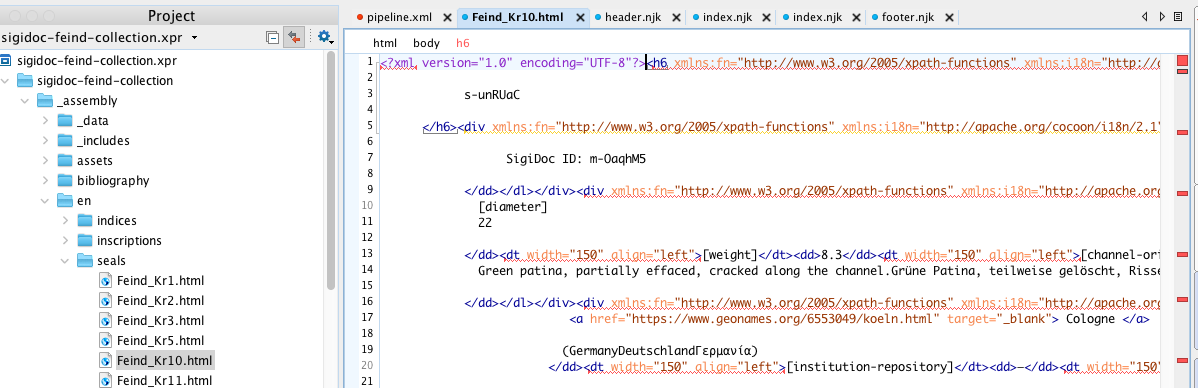
The Pages Look Wrong
Now switch to the preview and try navigating a seal page directly (e.g. by pointing the browser to 🌎 http://localhost:8080/en/seals/Feind_Kr1/). You'll notice two things are off:
- The page shows raw HTML without the site template (no header, footer, or navigation). This is because Eleventy needs a sidecar data file to know which layout to use. We'll fix that in the next step.
- The content itself is garbled, with text from different languages mashed together: "SiegelSealΜολυβδόβουλλο" instead of just "Seal".
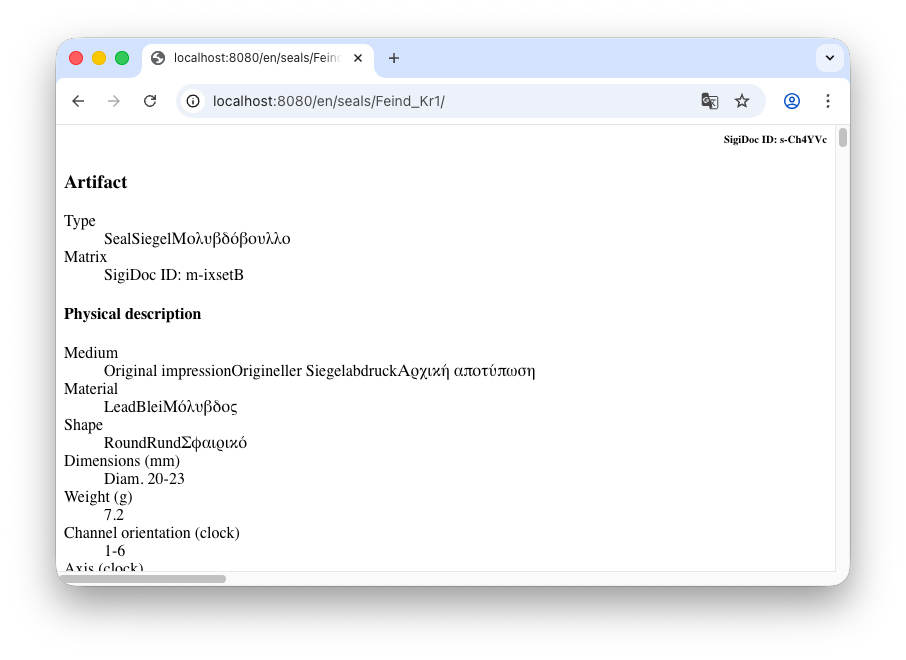 The garbled text happens because the SigiDoc XML files contain content in multiple languages side by side. For example, look at the object type in
 Feind_Kr1.xml:
<objectType>
  <term>
    <seg xml:lang="en">Seal</seg>
    <seg xml:lang="de">Siegel</seg>
    <seg xml:lang="el">Μολυβδόβουλλο</seg>
  </term>
</objectType>
English, German, and Greek are all in the same element. When the stylesheet renders this without filtering, it outputs all three: "SiegelSealΜολυβδόβουλλο". The same pattern repeats throughout the file (titles, materials, descriptions), producing the garbled output we see. Let's fix this first.
Fixing with Language Pruning
We need to filter the XML to a single language before transforming it. Add a new node just above transform-epidoc:
<xsltTransform name="prune-epidoc-english">
  <sourceFiles><files>source/seals/*.xml</files></sourceFiles>
  <stylesheet>
    <files>source/stylesheets/lib/prune-to-language.xsl</files>
  </stylesheet>
  <stylesheetParams>
    <param name="language">en</param>
  </stylesheetParams>
</xsltTransform>
This node takes each XML file and strips out all content that isn't marked as English, producing a pruned version. Our <objectType> example from above would become:
<objectType>
  <term>
    <seg xml:lang="en">Seal</seg>
  </term>
</objectType>
Notice the node has no <output> because its results are only needed by other pipeline nodes, not by external tools.
TIP
After a build, you can inspect the pruned XML files by clicking the folder icon next to prune-epidoc-english in the node list. Open one to see what the XML looks like with only English content remaining.
Connecting the Nodes with <from>
Now we need to change our transform-epidoc node so it reads the pruned XML instead of the raw source files. Replace its current <sourceFiles> element with this:
<sourceFiles>
  <from node="prune-epidoc-english" output="transformed"/>
</sourceFiles>
The <from> element says: "instead of reading files from disk, take the output of another pipeline node." This does two things:
- Provides the input: uses the
transformedoutput ofprune-epidoc-english - Creates a dependency: the pipeline knows it must run
prune-epidoc-englishbeforetransform-epidoc
Rebuild
The watcher detects the pipeline.xml changes, reloads the pipeline, and rebuilds. You should see both nodes in the node list. prune-epidoc-english runs first, then transform-epidoc.
Switch to the preview and open a seal page (e.g. 🌎 /en/seals/Feind_M163/) or refresh the page if you already have it open. The content is now clean English, with no more garbled multilingual text.
The content is correct now, but the two issues from before remain: the seal pages are still missing the site shell (header, footer, navigation), and the seal list at 🌎 /en/seals/ is still empty. Both are caused by the same thing: Eleventy doesn't know how to handle the HTML fragments yet. It needs a data sidecar file for each seal, a small JSON file that tells Eleventy which layout to use, what the page title is, and which collection the page belongs to.
Here's what such a file looks like. For Feind_Kr1.html, Eleventy expects a file called Feind_Kr1.11tydata.json next to it:
{
  "layout": "layouts/document.njk",
  "title": "Feind Kr1",
  "tags": "seals"
}
This tells Eleventy three things:
layout: wrap this HTML fragment in thedocument.njktemplate (which gives it the site header, footer, and navigation)title: the page title (used in the browser tab and the page heading)tags: add this page to thesealscollection, which is what populates the seal list page
Writing these by hand for every seal would be tedious, and the title and other metadata are already in the XML source files. In the next step, we will create the pipeline nodes that generate these sidecar files automatically from the XML.
What We've Built So Far
Here's the pipeline at this point, with three nodes:
The seal HTML fragments reach _output/ but without sidecar data files, Eleventy doesn't wrap them in the site template. That's what we'll fix next.