Customizing the Seal List
The seal list currently shows two columns: Document ID and Title. Let's add Dating and Category columns. First we add the metadata fields in the metadata extraction configuration, then we add the table columns in the website template.
Step 1: Add Metadata Fields
We're working with: metadata extraction configuration (source/metadata-config.xsl)
Open source/metadata-config.xsl and find the extract-metadata template. You'll see two commented-out lines:
<xsl:template match="tei:TEI" mode="extract-metadata">
	<!-- ... -->

	<!-- Uncomment to add more page metadata fields:
	<origDate><xsl:value-of select="string-join(//tei:origDate, ', ')"/></origDate>
	<category><xsl:value-of select="string-join(//tei:msContents/tei:summary/normalize-space(.), ', ')"/></category>
	-->

	<!-- ... -->
</xsl:template>
Uncomment them so they're active:
<xsl:template match="tei:TEI" mode="extract-metadata">
	<!-- ... -->

	<origDate><xsl:value-of select="string-join(//tei:origDate, ', ')"/></origDate>
	<category><xsl:value-of select="string-join(//tei:msContents/tei:summary/normalize-space(.), ', ')"/></category>

	<!-- ... -->
</xsl:template>
These extract two fields from the SigiDoc XML:
origDate: the dating information from the<origDate>element (e.g., "mid-10th c.")category: the seal category from the<summary>element (e.g., "Provincial administration")
Step 2: Verify the Data
After the pipeline rebuilt, inspect the results. Open a metadata XML file (click the folder icon next to extract-epidoc-metadata to see them). You should find the new fields in the <page> section:
<metadata>
	<!-- ... -->

	<page>
	    <title xml:lang="en">Seal of N. imperial protospatharios ...</title>
	    <sortKey xml:lang="en">Feind.Kr.00001.</sortKey>
	    <origDate xml:lang="en">
                        10th c.
                        10. Jh.
                        10ος αι.
        </origDate>
	    <category xml:lang="en">Provincial administration</category>
	</page>

	<!-- ... -->
</metadata>
Using Oxygen XML Editor to test metadata extraction
This is a good opportunity to test the extract-metadata transformation scenario using your Oxygen project. While customising metadata extraction by adapting your metadata-config.xsl, it is often easier to test changes directly in Oxygen instead of waiting for a pipeline rebuild, finding the result files and opening them for inspection. See the Oxygen Project guide page to see how it works. In short:
- Switch the Oxygen user interface to XSLT debug mode by selecting the "XSLT" button in the upper right corner. This mode shows input XML, XSLT, and output side by side.

- Open a seal file (e.g.,
source/seals/Feind_Kr10.xml) - Open
source/metadata-config.xsl - Select the seal XML as input file and
metadata-config.xslas XSL file. Leave the Output field empty:
- Click the transform button with the arrow icon in the XSL toolbar:
 The transformed output appears in the Output sidebar where you can see exactly what was extracted for each field. You can change the input XML or XSLT, click Transform again, and you can immediately see what changed in the output.
Step 3: Fix date and category extraction for SigiDoc encoding
After uncommenting the origDate and category extraction code in metadata-config.xsl, you might have noticed that the resulting origDate field in the extracted metadata looks off:
<origDate xml:lang="en">
	10th c.
	1. Jh.
	10ος αι.
</origDate>
<category xml:lang="en">Provincial administration. Provinzialverwaltug Μολυβδόβουλλα αξιωματούχων της περιφερειακής διοίκησης., Obverse, Reverse</category>
Instead of only a dating, we have three values, each on a new line, in different languages. For category, it is similar. The reason for both issues is the same, so let's focus on fixing the origDate extraction first:
The example origDate extraction code is designed for mono-lingual EpiDoc editions and expects origDate elements in the encoded source with simple text content, such as:
<origDate
	notBefore="0301"
	notAfter="0400"
	precision="low"
	evidence="titulature">Fourth century CE</origDate>
But in multilingual SigiDoc encoding, origDate is encoded like this:
<origDate type="analysis"
	notBefore="0901"
	notAfter="1000"
	evidence="iconography"
	cert="low"
	resp="MC">
		<seg xml:lang="en">10th c.</seg>
		<seg xml:lang="de">10. Jh.</seg>
		<seg xml:lang="el">10ος αι.</seg>
</origDate>
Instead of simple string content, tei:origDate contains a series of tei:seg elements each containing the dating in a specific language. Since we are currently building the English-only website, we need to adapt our origDate extraction XPath to select the content of the English seg element (in the extract-metadata-template in metadata-config.xsl):
<origDate><xsl:value-of select="string-join(//tei:origDate, ', ')"/></origDate>
<origDate><xsl:value-of select="string-join(//tei:origDate/tei:seg[@xml:lang='en'], ', ')"/></origDate>
This way, we get exactly the output we need in the extracted metadata, which is a single english-language string for origDate:
<page>
      <title xml:lang="en">Seal of Bardas patrikios, imperial protospatharios, and strategos of Anatolikoi</title>
      <sortKey xml:lang="en">Feind_Kr00010</sortKey>
      <origDate xml:lang="en">10th c.</origDate>
      <category xml:lang="en">Provincial administration. Provinzialverwaltug Μολυβδόβουλλα αξιωματούχων της περιφερειακής διοίκησης., Obverse, Reverse</category>
</page>
You'll notice category still doesn't look right – it has a similar issue as origDate has. Let's make the extraction XPath in metadata-config.xsl more specific to target exactly the English-language tei:seg in the seal's tei:summary element:
<category><xsl:value-of select="string-join(//tei:msContents/tei:summary/normalize-space(.), ', ')"/></category>
<category><xsl:value-of select="string-join(//tei:msContents/tei:summary/tei:seg[@xml:lang='en']/normalize-space(.), ', ')"/></category>
INFO
The sidecar JSON files now include these fields too. Open a .11tydata.json file in _assembly/en/seals/ to confirm:
{
  "layout": "layouts/document.njk",
  "tags": "seals",
  "documentId": "Feind_Kr1",
  "title": "Seal of N. imperial protospatharios ...",
  "origDate": "mid-10th c.",
  "category": "Provincial administration."
}
The data flows from your XML source through the metadata extraction into the sidecar JSON. Now we just need to display it.
Step 4: Add Table Columns
We're switching to: Website Templates (source/website/)
Open source/website/en/seals/index.njk. You'll see a commented-out Dating column:
<!-- ... -->
<table class="data-table">
    <thead>
    <tr>
        <th>Document ID</th>
        <th>Title</th>
        {# To add a column, uncomment below and add the corresponding field to metadata-config.xsl #}
        {# <th>Dating</th> #}

    </tr>
    </thead>
Uncomment the Dating <th> (table header, highlighted above) by removing the wrapping {# and #} (these mark columns in the Nunjucks template language), then add a Category column header:
<!-- ... -->
<table class="data-table">
    <thead>
    <tr>
        <th>Document ID</th>
        <th>Title</th>
        {# To add a column, uncomment below and add the corresponding field to metadata-config.xsl #}
        <th>Dating</th>
        <th>Category</th>
    </tr>
    </thead>
And in the {% for document in sorted %} loop a few lines down, do the same for the matching <td>s (table cells) – uncomment the origDate cell by removing {# and #}, then add the cell for category:
<!-- ... -->
{% for document in sorted %}
	<tr>
		<td><a href="{{ document.url }}">{{ document.data.documentId }}</a></td>
		<td>{{ document.data.title }}</td>
		<td>{{ document.data.origDate }}</td>
		<td>{{ document.data.category }}</td>
	</tr>
{% endfor %}
<!-- ... -->
Notice how document.data.category and document.data.origDate match the field names from the sidecar JSON, which in turn match the element names in metadata-config.xsl. The names you choose in the XSLT are the names you use in the template.
How does Eleventy make this data available?
When Eleventy finds a .11tydata.json file next to an .html file, it reads the JSON and attaches all its fields to that page. In the seal list template, {% for document in sorted %} loops over all seal pages, and document.data gives you access to everything from the corresponding sidecar JSON.
1. XML source (Feind_Kr1.xml):
<origDate notBefore="0941" notAfter="0960">mid-10th c.</origDate>2. You extract it in metadata-config.xsl:
<origDate><xsl:value-of select="string-join(//tei:origDate, ', ')"/></origDate>3. It appears in the metadata XML (extract-epidoc-metadata output):
<origDate>mid-10th c.</origDate>4. It ends up in the sidecar JSON (Feind_Kr1.11tydata.json):
"origDate": "mid-10th c."5. You display it in the template (index.njk):
{{ document.data.origDate }}This means any field you add in metadata-config.xsl automatically becomes available in templates as document.data.yourFieldName.
See It Work
Rebuild and open the seal list. You should now see four columns (Document ID, Title, Category, and Dating) populated with data extracted from each seal's XML source.
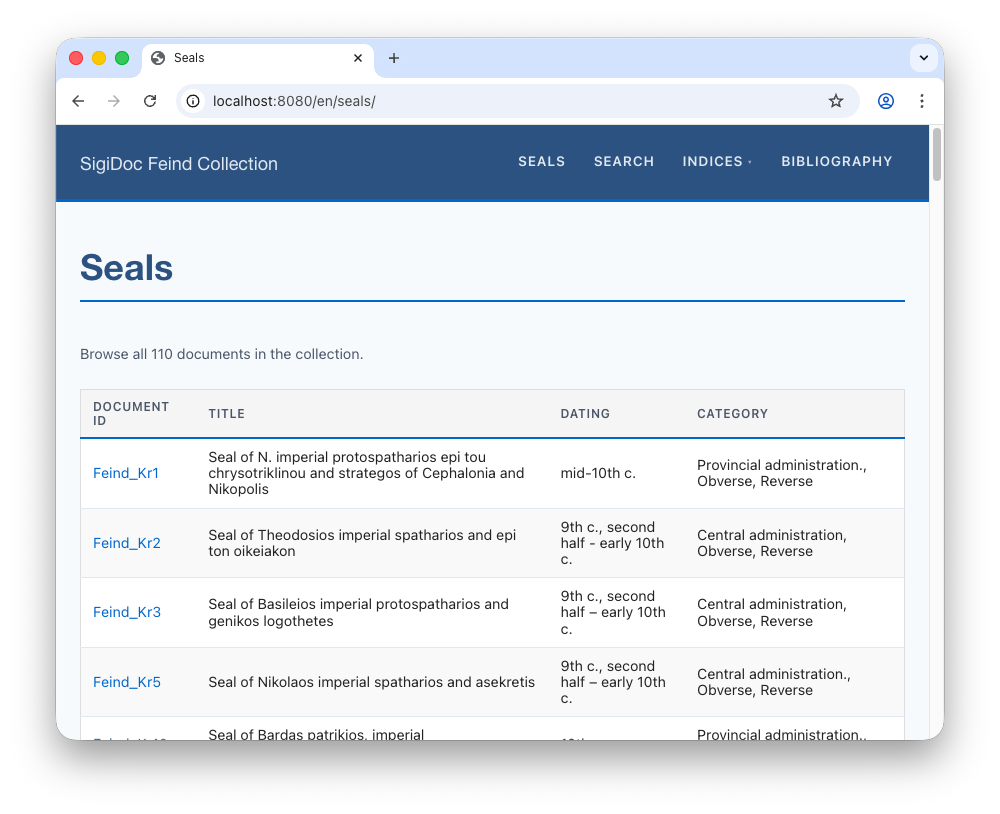
This is the full data flow in action:
To add more columns, repeat this pattern: add an extraction element in metadata-config.xsl, then add the <th> and <td> in the template. The element name you choose becomes the field name in the JSON and the property name in the template.
Next, let's add browsable indices: Indices →