Exploring the Project
Before adding content, let's understand what we generated. Open pipeline.xml in a text editor.
Tip
If you have Oxygen XML Editor, open the sigidoc-feind-collextion.xpr project created as part of your project files. This Oxygen project is for pipeline and metadata configuration validation, documentation, and transformations set up for inspecting and debugging individual steps. See Oxygen Project for details.
The Pipeline
A pipeline is a series of processing steps, called nodes, that transform your source files into a website. Think of it as a recipe: each step takes some input, does something with it, and produces output that the next step can use.
Here's a simplified view of what a typical pipeline does:
Each box is a node. The arrows show how data flows between them: the "Extract metadata" node feeds into "Generate page data files", "Aggregate indices", and "Aggregate search data". Nodes that don't depend on each other (like "Copy website templates" and "Transform XML to HTML") run in parallel.
Technical: Directed Acyclic Graphs (DAGs)
This kind of structure is called a directed acyclic graph (DAG) in computer science. "Directed" means data flows in one direction (from input to output). "Acyclic" means there are no loops: a node can never depend on its own output, directly or indirectly.
The pipeline automatically figures out the correct execution order from the dependency graph. You don't need to specify the order yourself. Just declare what each node needs as input, and the pipeline handles the rest.
Reading the Pipeline XML
Let's look at the actual pipeline.xml. Every pipeline starts with a root element and some metadata:
<?xml version="1.0" encoding="UTF-8"?>
<?xml-model href="efes-ng.rng" type="application/xml" schematypens="http://relaxng.org/ns/structure/1.0"?>
<?xml-model href="efes-ng.rng" type="application/xml" schematypens="http://purl.oclc.org/dsdl/schematron"?>
<pipeline xmlns="urn:efes-ng:pipeline" name="My SigiDoc Project">
  <meta siteDir="_output"/>

  <!-- Nodes are here -->
</pipeline>
The name attribute is a display label. siteDir tells the live preview server which directory contains the pipeline's final output, so it can serve and preview that directory.
Nodes
Each node is an XML element inside <pipeline>. The element name determines the type of node, and the name attribute gives it a unique identifier. Let's walk through the nodes you'll find in the generated pipeline.
Copying the Website Template
<pipeline xmlns="urn:efes-ng:pipeline" name="My SigiDoc Project">
	<!-- ... -->
	<copyFiles name="copy-eleventy-site">
	  <sourceFiles><files>source/website/**/*</files></sourceFiles>
	  <output to="_assembly" stripPrefix="source/website"/>
	</copyFiles>
	<!-- ... -->
</pipeline>
This node copies the website template files (layouts, CSS, homepage) into the _assembly directory. It's the simplest kind of node: take files from here, put them there.
What does <files>source/website/**/*</files> mean?
The <files> element contains a glob pattern, a way to describe a set of files using wildcards. **/* means "all files in all subdirectories". So source/website/**/* matches every file inside the source/website/ folder.
Other common patterns:
source/seals/*.xml: all XML files directly in theseals/foldersource/**/*.xml: all XML files anywhere undersource/source/stylesheets/lib/epidoc-to-html.xsl: a single specific file
Commented-Out Nodes
You'll also notice several commented-out nodes in the generated pipeline, for XSLT transformations, metadata extraction, index aggregation, and more. These are templates we'll uncomment and configure in the next steps when we add content to the project. For now, just note that they're there.
The Final Build
<eleventyBuild name="eleventy-build">
  <sourceDir><collect>_assembly</collect></sourceDir>
  <output to="_output"/>
</eleventyBuild>
The last node uses Eleventy to build the final website from everything that was assembled in the _assembly directory. The <collect> element is a way to declare dependencies (2e'll explain how it works later).
What is a static site generator?
A static site generator (SSG) takes content files and templates and produces a complete set of HTML pages: a "static" website that can be served by any web server without a database or application runtime.
Eleventy is the SSG used in this prototype. It processes the Nunjucks templates in the source/website/ directory, wrapping the HTML fragments produced by XSLT into complete pages with headers, footers, and navigation.
Using Eleventy is one possible choice. The pipeline system is flexible enough that other generators (or even a pure XSLT-based approach) could be used instead. This documentation focuses on using Eleventy.
Viewing the Pipeline in the GUI
The desktop application shows the pipeline as a node list with real-time status. Open your project and you'll see each node listed. Click any node to inspect its configuration, dependencies, and outputs in the side panel.
When you click Start, you can watch the nodes execute. Independent nodes run in parallel, and each node shows a progress counter as it processes files.
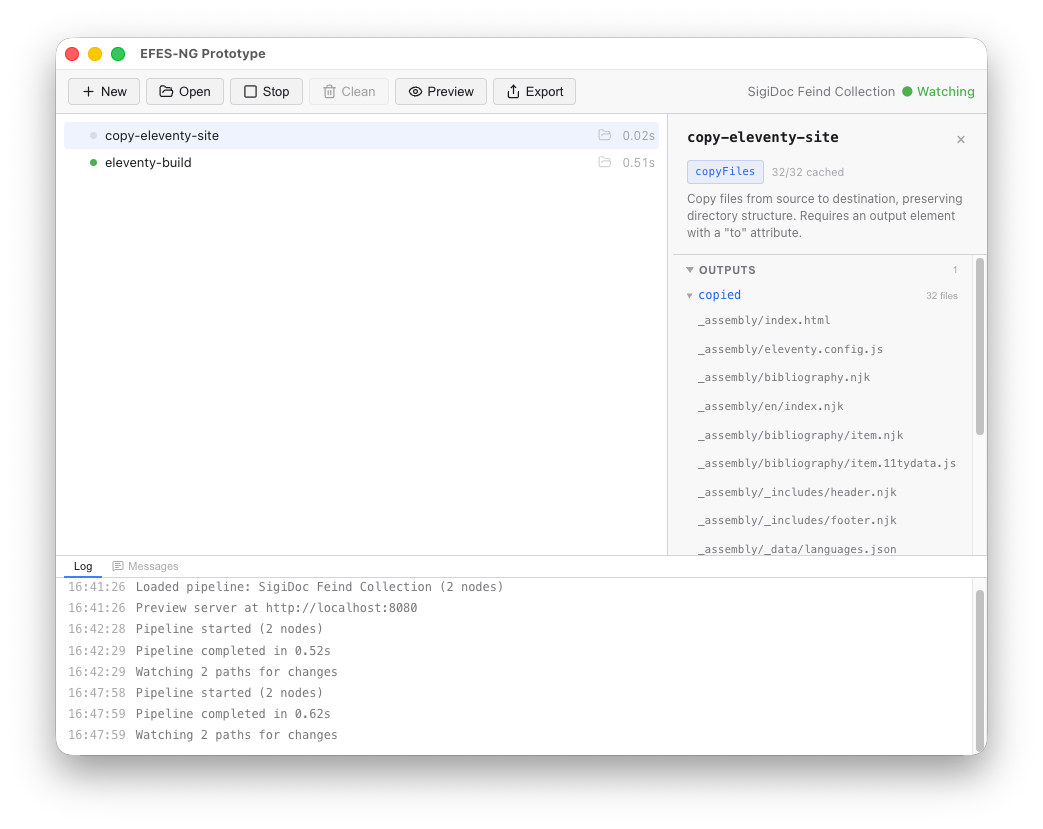 The green badge in the upper right corner of the window indicates that the pipeline is in Watch mode. This means that on any change made to a source file, the pipeline will run again and the browser will automatically re-load the preview site, making your changes immediately visible as soon as the build ends.
Now that we understand the pipeline structure, let's customize the site: Customizing the Site →