Metadata and Data Generation
The seal pages render content, but they're missing the site shell (header, footer, navigation) and the seal list is empty. Both problems are solved by generating sidecar data files: small JSON files that tell Eleventy how to handle each page.
We will add two pipeline nodes to do this: one extracts metadata from the XML, the other generates the JSON files.
We're still working with: Pipeline Configuration (pipeline.xml)
Why Two Steps?
You might wonder why this isn't a single step. Remember the pipeline diagram from Exploring the Project? The "Extract metadata" node feeds into three different consumers: page data files, index aggregation, and search data. By extracting the metadata once into an intermediate format, we avoid re-processing every XML file three times.
We'll configure the first two nodes, Extract metadata and Generate page data now. Index aggregation and search come later.
Extracting Metadata
The extract-epidoc-metadata node reads each XML source file and extracts structured metadata (title, sort key, document ID, and other fields) into intermediate XML files.
Uncomment this node in pipeline.xml, you'll find it after after transform-epidoc. Adapt source/inscriptions to source/seals to match our project:
<xsltTransform name="extract-epidoc-metadata">
  <sourceFiles><files>source/seals/*.xml</files></sourceFiles>
  <stylesheet><files>source/metadata-config.xsl</files></stylesheet>
  <stylesheetParams>
    <param name="languages">en</param>
  </stylesheetParams>
</xsltTransform>
Unlike transform-epidoc, this node reads the raw source XML directly, without pruning. The extraction templates use the languages parameter to select the right language content internally.
- It transforms each file with
metadata-config.xsl: your project's metadata configuration stylesheet, which defines which fields to extract from the XML - No
<output>: this node's results are only consumed by other pipeline nodes via<from>, so the default build directory (.efes-build/extract-epidoc-metadata/) is fine
What does metadata-config.xsl do?
This stylesheet is the bridge between your XML encoding and the website's metadata needs. It imports the generic extract-metadata.xsl library provided by the EFES-NG Prototype as part of your project and adds project-specific extraction logic.
The generated scaffold already extracts two fields:
title: from the first non-empty<title>in the TEI header, falling back to the filenamesortKey: auto-generated from the filename for natural sort ordering
You can open source/metadata-config.xsl to see how these are extracted:
<xsl:template match="tei:TEI" mode="extract-metadata">
	<!-- ... -->

	<!-- Title: first <title> in titleStmt, falls back to filename -->
    <title><xsl:value-of select="(//tei:titleStmt/tei:title[1]/normalize-space(.)[.], $filename)[1]"/></title>

    <!-- re-usable $sortKey variable defined at the top of this file -->
    <sortKey><xsl:value-of select="$sortKey"/></sortKey>

	<!-- ... -->
</xsl:template>
You can customize or add more fields later (like dates, categories, or findspots). The scaffold also has commented-out examples for additional fields and index definitions.
For the full picture of how metadata-config.xsl works, including the three hook templates, index declarations, and how multilingual content is handled, see the Metadata Configuration guide.
After the build, you can inspect the generated metadata files: in the GUI, click the folder icon next to the extract-epidoc-metadata node in the node list to open its output directory. Each XML source file has a corresponding metadata XML file. Open one. Here's what Feind_Kr1.xml looks like:
<metadata>
  <documentId>Feind_Kr1</documentId>
  <sourceFile>Feind_Kr1.xml</sourceFile>
  <page>
    <title xml:lang="en">Seal of N. imperial protospatharios ...</title>
    <sortKey xml:lang="en">Feind.Kr.00001.</sortKey>
  </page>
  <entities/>
  <search>
    <title xml:lang="en">Seal of N. imperial protospatharios ...</title>
    <material xml:lang="en">Lead</material>
    <fullText xml:lang="en">Κ ύρι ε βοήθει ...</fullText>
  </search>
</metadata>
Notice how the structure reflects what's configured: documentId and sourceFile come from the framework automatically. The <page> section contains fields from your metadata-config.xsl, here title and sortKey. Each field carries an xml:lang attribute (the framework adds this automatically based on the configured languages). The entities section is empty for now; we'll populate it when we add indices later.
How do I add a new metadata field?
The metadata-config.xsl contains an <xsl:template> named extract-metadata that will be applied to each XML source file, matching on it's tei:TEI root element. It is expected to return one XML for each metadata field you want to extract. To add a new field, for instance date, add a <date> element to the template's output containing the extracted value:
<date><xsl:value-of select="//tei:orgDate"/></date>Generating Sidecar Files
The generate-eleventy-data node takes the extracted metadata and produces the .11tydata.json sidecar files that Eleventy needs. It uses the create-11ty-data.xsl stylesheet provided as part of your generated project, a simple transformation that reads the metadata XML and produces a JSON file.
Uncomment it (find it below extract-epidoc-metadata) and adapt the configuration: change inscriptions to seals in the tags parameter and in the <output> element in the three highlighted lines:
<xsltTransform name="generate-eleventy-data">
  <sourceFiles>
    <from node="extract-epidoc-metadata" output="transformed"/>
  </sourceFiles>
  <stylesheet>
    <files>source/stylesheets/lib/create-11ty-data.xsl</files>
  </stylesheet>
  <stylesheetParams>
    <param name="layout">layouts/document.njk</param>
    <param name="tags">seals</param>
    <param name="language">en</param>
  </stylesheetParams>
  <output to="_assembly/en/seals"
          stripPrefix="source/seals"
          extension=".11tydata.json"/>
</xsltTransform>
This node uses <from> to read the metadata XML produced by extract-epidoc-metadata, the same pattern we introduced in the previous step. The language parameter tells it which language's fields to pick from the metadata (selecting fields where xml:lang matches).
The stylesheet parameters control the sidecar content:
layout: which Eleventy layout to use for these pagestags: which collection to add the pages to (this is what makes them appear in the seal list)
The <output> uses the same to/stripPrefix/extension pattern as before. The sidecar file must end up next to the corresponding HTML file and share the same base name. That's how Eleventy pairs them:
HTML (from transform-epidoc) | Sidecar (from generate-eleventy-data) |
|---|---|
_assembly/en/seals/Feind_Kr1.html | _assembly/en/seals/Feind_Kr1.11tydata.json |
Inspecting the Results
The watcher detects the pipeline.xml changes and rebuilds. You should see the two new nodes, extract-epidoc-metadata and generate-eleventy-data, appear in the node list and run in sequence (since the second depends on the first).
Once the build completes, inspect the file _assembly/en/seals/ directory again. Next to each .html file, there's now a .11tydata.json file:
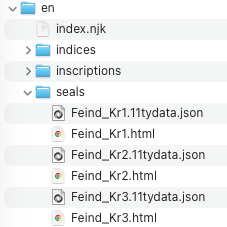
Open one. Here's what it looks like:
{
  "layout": "layouts/document.njk",
  "tags": "seals",
  "documentId": "Feind_Kr1",
  "title": "Seal of N. imperial protospatharios epi tou chrysotriklinou ...",
  "sortKey": "Feind.Kr.00001."
}
Beyond the three fields we introduced earlier (layout, tags, title), the pipeline added documentId and sortKey. The title and sort key come from your metadata-config.xsl. If you open that file, you can see exactly how they're extracted. The documentId is provided by the framework automatically.
The sortKey ensures seals are listed in natural order (so Feind_Kr2 comes before Feind_Kr10), and the title is what appears in the seal list and browser tab.
Now switch to the preview. If you navigate to a seal URL such as url /en/seals/Feind_Kr1/ (or refresh the seal page if you still have it open), you'll see the seal content wrapped in the site template with header, footer, and navigation:
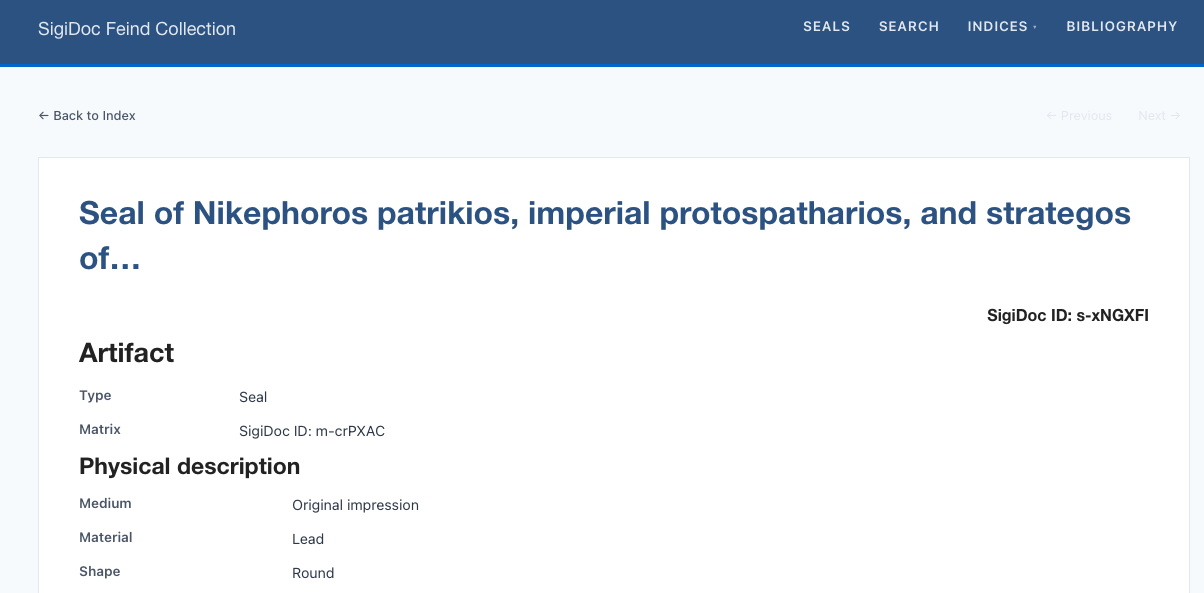
Individual seal pages work, but the seal list at url /en/seals/ is still empty.
Connecting the Seal List
Why is the list empty? The tags parameter we just set to "seals" in the generate-eleventy-data node tells Eleventy to group these pages into a collection called seals. But the list template is still looking for the default collection name from the scaffold (inscriptions).
We're switching to: Website Templates (source/website/)
Open file 📄 source/website/en/seals/index.njk. Near the top you'll see a collections.inscriptions reference, highlighted below. Change it to collections.seals. This must match the tags value we set in the pipeline:
---
layout: layouts/base.njk
title: Seals
---

{# Collection name must match the "tags" stylesheet parameter in the generate-eleventy-data pipeline node #}
{% set documents = collections.seals %}

<p class="index-intro">Browse all {{ documents | length | default(0) }} documents in the collection.</p>
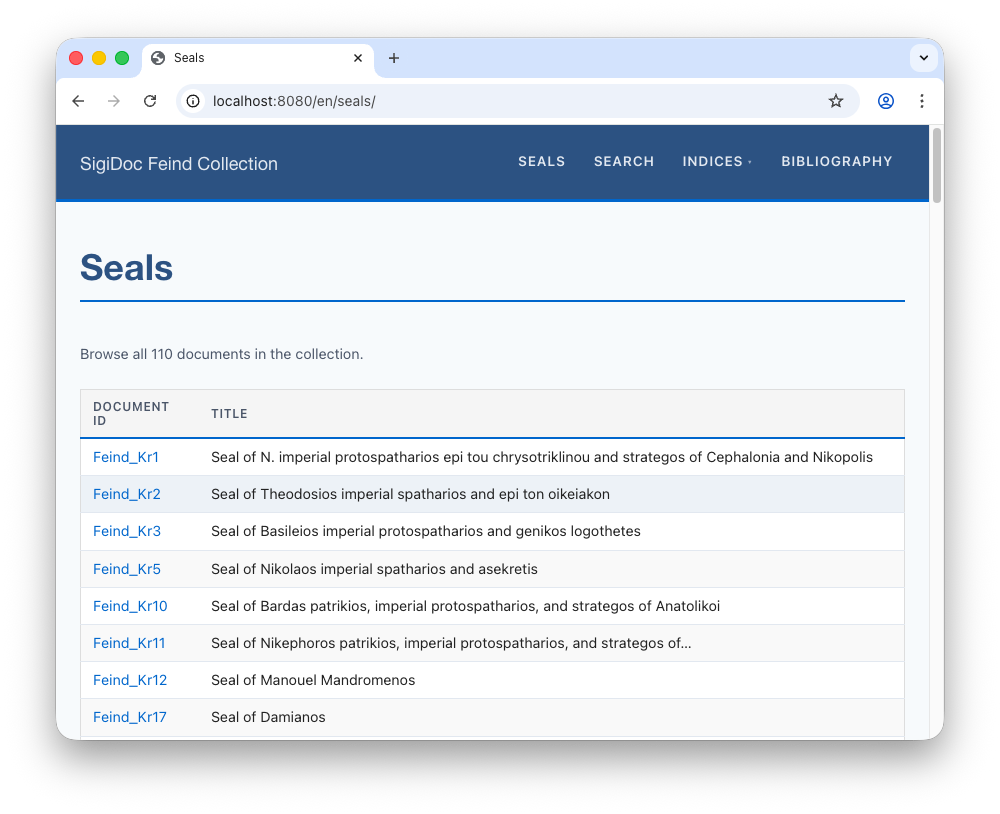
Notice how the rest of the template uses the documents variable to loop over the collection and display each seal's documentId and title in a table. These are the same fields from the sidecar JSON we saw earlier (you don't need to change anything here for now):
{% for document in sorted %}
	<tr>
		<td><a href="{{ document.url }}">{{ document.data.documentId }}</a></td>
		<td>{{ document.data.title }}</td>
		{# <td>{{ document.data.origDate }}</td> #}
    </tr>
{% endfor %}
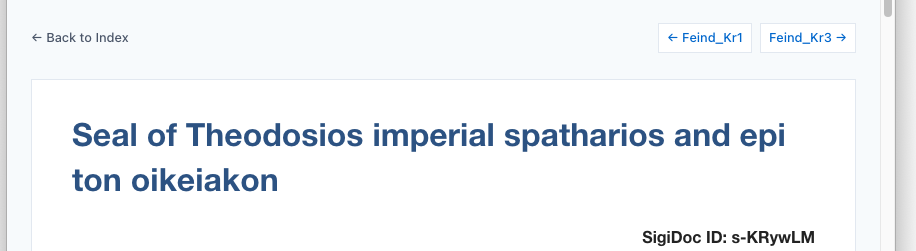
The same change is needed in source/website/_includes/layouts/document.njk, which is the layout that wraps each individual seal page and provides prev/next navigation. Find the collections.inscriptions line and change it to collections.seals.
---
layout: layouts/base.njk
suppressTitle: true
---

{# Prev/next navigation: pass the collection sorted by sortKey.
   The i18n plugin automatically resolves to the current language's equivalent page. #}
{% set sorted = collections.inscriptions | sort(false, false, "data.sortKey") %}
{% set previousPost = sorted | getPreviousCollectionItem %}
{% set nextPost = sorted | getNextCollectionItem %}
Also change the destination (href) of the "Back to Index" link a few lines below:
<nav class="doc-nav">
<a href="/{{ page.lang }}/seals/" class="doc-nav-back">← Back to Index</a>
<!-- ... -->After saving and rebuilding, the seal list populates and the prev/next navigation on individual seal pages works:
TIP
Try editing one seal source file, for example by changing its title and saving. The watcher will rebuild only the affected files, and the live preview will reload and show the changes automatically.
What We've Built So Far
Here's the pipeline as it stands now, with five nodes working together:
Nodes and outputs highlighted in blue were added in this step.
What's Next
The seal list shows Document ID and Title. Let's add more columns: Customizing the Seal List →