Indices
The seal pages and seal list work, but the Indices section is still empty. Indices are browsable tables that collect entities (persons, places, dignities, offices) extracted from across all your documents. Let's add one.
How Indices Work
An index configuration has three parts:
- Definition: in
metadata-config.xsl, an<idx:index>block declares the index (its ID, title, and column layout) - Extraction: an XSLT template finds the relevant entities in each XML source file and outputs
<entity>elements - Aggregation: a pipeline node combines all extracted entities across documents into a single JSON file that can be read by Eleventy
The data flows like this:
We already have the extraction step (extract-epidoc-metadata), but its <entities> section was empty because we hadn't defined any indices yet. Let's fix that.
See also
This page walks through one specific index for the Feind project. For the broader picture, including the <idx:index> schema, the three hook templates, multilingual handling, and entity merging across documents, see the Metadata Configuration guide.
Step 1: Adding a Persons Index
We're working with: XSLT Index Configuration (source/metadata-config.xsl)
Open source/metadata-config.xsl. The scaffold includes a commented-out persons index example. We'll uncomment and adapt it in three places.
Define the Index
Find the commented-out <idx:index id="persons"> block and uncomment it. We'll also rename Name to Forname add a Surname column, since the scaffold only has a generic Name column but our SigiDoc seals have separate forenames and surnames:
<idx:index id="persons" nav="indices" order="10">
    <idx:title>Persons</idx:title>
    <idx:description>Persons attested in the collection.</idx:description>
    <idx:columns>
        <idx:column key="forename"><idx:label>Forename</idx:label></idx:column>
        <idx:column key="surname"><idx:label>Surname</idx:label></idx:column>
        <idx:column key="references" type="references"><idx:label>Seals</idx:label></idx:column>
    </idx:columns>
</idx:index>
This declares an index called "Persons" with three columns. Each <idx:column> has a key attribute (matching a field name in the extracted entity data) and an <idx:label> that becomes the column header. The type="references" tells the template to render the column as clickable links to seal pages.
Make sure you have adapted the both column key attribute as well as the idx:labelfor the Name to Forename change.
Adapt the Extraction Template
Uncomment the extract-persons template below the index definition. The scaffold provides a generic version that extracts all <tei:persName> elements:
<!-- Scaffold default (generic) -->
<xsl:template match="tei:TEI" mode="extract-persons">
    <xsl:for-each select=".//tei:persName[normalize-space()]">
        <xsl:variable name="displayName" select="normalize-space(.)"/>
        <entity indexType="persons">
            <name><xsl:value-of select="$displayName"/></name>
            <sortKey><xsl:value-of select="lower-case($displayName)"/></sortKey>
        </entity>
    </xsl:for-each>
</xsl:template>
This works as a starting point, but for our SigiDoc project the person encoding is more specific: seal issuers are in <listPerson type="issuer"> with separate forename and surname elements in multiple languages:
<listPerson type="issuer">
	<person role="private" gender="M">
		<persName xml:lang="en">
			<forename>Manouel</forename>
			<surname>Mandromenos</surname>
		</persName>
		<persName xml:lang="de">
			<forename>Manouel</forename>
			<surname>Mandromenos</surname>
		</persName>
		<persName xml:lang="el">
			<forename>Μανουήλ</forename>
			<surname>Μανδρομηνοός</surname>
		</persName>
	</person>
</listPerson>
Let's adapt the extraction template accordingly (you can copy and paste it into your metadata-config.xsl, replacing the original extract-persons template):
<!-- Adapted for SigiDoc seal issuers -->
<xsl:template match="tei:TEI" mode="extract-persons">
    <xsl:param name="language" tunnel="yes"/>
    <xsl:for-each select=".//tei:listPerson[@type='issuer']/tei:person">
        <xsl:variable name="name" select="(tei:persName[@xml:lang='en'], tei:persName)[1]"/>
        <xsl:variable name="forename" select="normalize-space($name/tei:forename)"/>
        <xsl:variable name="surname" select="normalize-space($name/tei:surname)"/>
        <xsl:if test="$forename or $surname">
            <entity indexType="persons">
                <forename><xsl:value-of select="$forename"/></forename>
                <surname><xsl:value-of select="$surname"/></surname>
                <sortKey><xsl:value-of select="lower-case(string-join(($forename, $surname)))"/></sortKey>
            </entity>
        </xsl:if>
    </xsl:for-each>
</xsl:template>
The key differences from the scaffold version:
- We target
tei:listPerson[@type='issuer']instead of all `tei:persName - We target the English-language
tei:persNameelements by selecting for `[@xml:lang='en'] - We extract
forenameandsurnameas separate fields (matching our column definitions) - The
sortKeycombines forename and surname for alphabetical ordering
Each returned <entity> must have:
indexTypematching the index ID ("persons")- Fields matching the column keys: here
forenameandsurname sortKeyfor ordering
The framework auto-stamps xml:lang on your output fields, merges entities across language iterations (by position), and groups them across all documents (by sortKey) to collect references.
Register the Extraction
Find the extract-all-entities template further down in extract-metadata.xsl and uncomment the apply-templates line:
<xsl:template match="tei:TEI" mode="extract-all-entities">
    <xsl:apply-templates select="." mode="extract-persons"/>
</xsl:template>
This tells the metadata extraction to run your persons template for each document. When you add more indices later, you add more apply-templates lines here.
Verify the Extraction
After the pipeline rebuild, inspect a metadata XML file (click the folder icon next to extract-epidoc-metadata), or test the metadata extraction in Oxygen. The <entities> section that was empty before should now contain person data. The extraction template we wrote above returned one entity element with type="persons"for each seal issuer.
<entities>
    <persons>
        <entity indexType="persons">
            <forename xml:lang="en">Manouel</forename>
            <surname xml:lang="en">Mandromenos</surname>
            <sortKey xml:lang="en">manouel mandromenos</sortKey>
        </entity>
        <!-- ... -->
    </persons>
</entities>
Step 2: Adding the Aggregation Node
We're switching to: Pipeline Configuration (pipeline.xml)
The extraction produces per-document entity data, but the index page needs all persons combined into one table. The aggregate-indices node does this.
Uncomment it in pipeline.xml, you can leave everything as is:
<xsltTransform name="aggregate-indices">
    <stylesheet>
        <files>source/stylesheets/lib/aggregate-indices.xsl</files>
    </stylesheet>
    <initialTemplate>aggregate</initialTemplate>
    <stylesheetParams>
        <param name="metadata-files">
            <from node="extract-epidoc-metadata" output="transformed"/>
        </param>
        <param name="metadata-config">
            <files>source/metadata-config.xsl</files>
        </param>
    </stylesheetParams>
    <output to="_assembly/_data/indices" filename="_summary.json"/>
</xsltTransform>
This node is different from the ones we've seen before:
- Instead of using
<sourceFiles>for processing input files one by one, this node uses<initialTemplate>to call a named template (aggregate) that processes all metadata files at once to produce combined output.
- The
metadata-files: XSL parameter passes all the metadata XML files fromextract-epidoc-metadataas a parameter to the stylesheet. This is how the aggregation gets access to entity data from every document at once. It uses<from>to read the metadata files produced by theextract-epidoc-metadatanode. - The
metadata-configXSLT parameter passes yourmetadata-config.xslso theaggregate-indices.xslstylesheet knows which indices are defined and how their columns are structured <output filename="_summary.json">produces a single file rather than one per input. The aggregation stylesheet also produces individual JSON files for each index (e.g.,persons.json) alongside the summary
How Does Eleventy Know to Wait?
You might wonder: we didn't add a <from> dependency between aggregate-indices and eleventy-build. How does the Eleventy build know to wait for the index data?
Look at the eleventyBuild node's configuration:
<eleventyBuild name="eleventy-build">
    <sourceDir><collect>_assembly</collect></sourceDir>
    ...
</eleventyBuild>
Back in Exploring the Project, we mentioned that <collect> would be explained later. Here's how it works. The <collect> element creates an implicit dependency on all nodes that write files into the specified directory. Since aggregate-indices writes to _assembly/_data/indices/, and transform-epidoc writes to _assembly/en/seals/, and copy-eleventy-site writes to _assembly/, this single <collect> ensures the Eleventy build waits for all of them to finish, without you having to list every dependency explicitly.
Inspecting the Aggregated Data
Rebuild and open the output directory for aggregate-indices (click the folder icon). You'll find two kinds of files:
_summary.json: a list of all defined indices with entry counts:
{
  "indices": [
    {
      "id": "persons",
      "title": "Persons",
      "description": "Persons attested in the collection.",
      "entryCount": 69
    }
  ]
}
The indices landing page (source/website/en/indices/index.njk) reads this file to show an overview card for each index.
persons.json: the full data for the persons index. You might wonder how this file got here. The pipeline only specifies _summary.json as the output filename. The aggregation stylesheet uses an XSLT feature called xsl:result-document to write additional files alongside the primary output. For each index it defines, it produces a separate JSON file. The file names are derived from the index IDs in your metadata-config.xsl.
Here's what persons.json looks like:
{
  "id": "persons",
  "title": "Persons",
  "columns": [
    { "key": "forename", "header": "Forename" },
    { "key": "surname", "header": "Surname" },
    { "key": "references", "header": "Seals", "type": "references" }
  ],
  "entries": [
    {
      "forename": { "en": "Manouel" },
      "surname": { "en": "Mandromenos" },
      "sortKey": { "en": "manouel mandromenos" },
      "references": [
        { "inscriptionId": "Feind_Kr12" }
      ]
    }
  ]
}
Notice how the aggregation grouped all occurrences of each person across documents and collected the references. The column definitions come from the <idx:index> block you defined, and they tell the template how to render the table.
How does Eleventy make this data available?
Eleventy has a special convention: any JSON file in a _data/ directory is automatically loaded and made available to templates. The directory structure becomes the property path, so files in _data/indices/ become properties of indices. So _data/indices/persons.json is available as indices.persons, and _data/indices/_summary.json as indices._summary. That's why the index page template can simply write {% set indexData = indices.persons %}, no configuration needed.
Step 3: Creating the Index Page
We're switching to: Website Templates (source/website/)
The indices landing page (source/website/en/indices/index.njk) already exists and will automatically show your new index as a card. But we need a page to display the actual persons table.
The scaffold includes an example template for this. Rename source/website/en/indices/persons.njk.example to persons.njk.
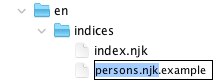
Then update the documentBasePath to point to our seals instead of /en/inscriptions:
---
layout: layouts/base.njk
title: Persons
---
{% set documentBasePath = "/" + page.lang + "/seals" %}
{% set indexData = indices.persons %}
{% include "partials/index-table.njk" %}
The template is short because the heavy lifting is done by the shared source/website/_includes/partials/index-table.njk partial. It reads the persons.json data and renders the table with the columns we defined in the index definition.
The documentBasePath variable tells the template where your seal pages live, so the reference links point to the right URLs (e.g., /en/seals/Feind_Kr1/).
See It Work
After the pipeline rebuilt, switch to the preview and navigate your browser to 🌎 /en/indices/ (or click the Indices main menu entry, and notice that a Persons entry has been added to the drop down menu that appears when hovering it):

On the Indices landing page, you should see a "Persons" card with an entry count: 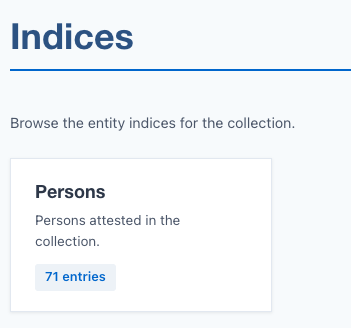
Click it to see the full table at 🌎 /en/indices/persons/:
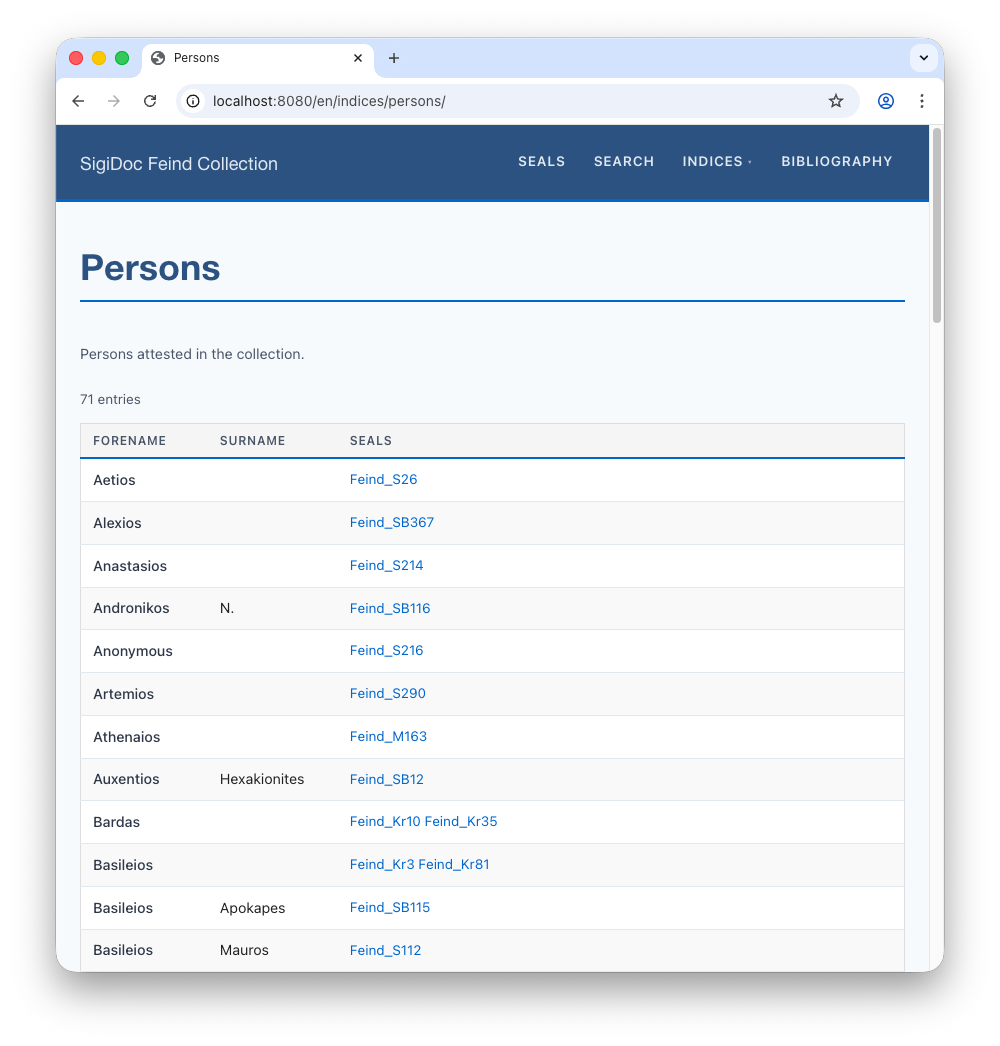
Adding More Indices
To add another index (places, dignities, offices, etc.), repeat the pattern:
- Add an
<idx:index>definition inmetadata-config.xsl - Add an extraction template (
mode="extract-yourindex") - Register it in
extract-all-entities - Create a page template (
en/indices/yourindex.njk)
The SigiDoc FEIND project has complete examples with five indices. See its metadata-config.xsl for reference.
Advanced: Showing Greek Names
The persons index shows transliterated names ("Basileios Apokapes"), but the SigiDoc XML also has the original Greek. Let's add a column for it.
First, add the column to the index definition in metadata-config.xsl:
<idx:index id="persons" nav="indices" order="10">
    <idx:title>Persons</idx:title>
    <idx:description>Persons attested in the collection.</idx:description>
    <idx:columns>
        <idx:column key="forename"><idx:label>Forename</idx:label></idx:column>
        <idx:column key="surname"><idx:label>Surname</idx:label></idx:column>
        <idx:column key="greekName"><idx:label>Greek</idx:label></idx:column>
        <idx:column key="references" type="references"><idx:label>Seals</idx:label></idx:column>
    </idx:columns>
</idx:index>
Then add the field to the extraction template. The Greek name is in tei:persName[@xml:lang='grc']:
<xsl:variable name="greekName" select="normalize-space(
    string-join((tei:persName[@xml:lang='grc']/tei:forename,
                 tei:persName[@xml:lang='grc']/tei:surname), ' ')
)"/>
<entity indexType="persons">
    <forename><xsl:value-of select="$forename"/></forename>
    <surname><xsl:value-of select="$surname"/></surname>
    <greekName><xsl:value-of select="$greekName"/></greekName>
    <sortKey><xsl:value-of select="lower-case(string-join(($forename, $surname)))"/></sortKey>
</entity>
Rebuild. The persons table now shows three columns: Forename, Surname, and Greek. For "Basileios Apokapes," the Greek column shows "Βασίλειος Ἀποκάπης".
What We've Built So Far
The aggregate-indices node (highlighted in blue) is new in this step. It reads the metadata we already extract and produces index JSON files that Eleventy renders as browsable tables.
Next, let's make the seals searchable. Search →